Introducing the BelDoc Notary Dashboard: Manage Company Incorporations in One Place
Updated: 3 days ago
BelDoc is expanding its digital company incorporation platform in Belgium with a new workspace built specifically for notaries.
The BelDoc Notary Dashboard allows Belgian notaries and notarial offices to receive, review and manage company incorporation applications through one structured digital environment.
Instead of coordinating incorporation files across emails, attachments and separate communication with founders and their advisers, notaries can now manage the process in BelDoc — from receiving a structured application to completing the incorporation and handing the company information over to the Business Counter.
One dashboard for company incorporation applications
The Notary Dashboard gives notaries a single overview of the incorporation applications assigned to them or their office.
From the dashboard, a notary can:
view all incorporation applications in one place;
search for applications by company name or application number;
track files by status, including new, in progress and completed;
access company, founder and application information;
review generated incorporation documents;
request missing information or corrections;
return an application for revision when necessary;
track pending actions;
receive reminders when action is required.

BelDoc Incoming Messages showing notifications and status updates for company incorporation applications.
This gives the notarial office a structured view of each incorporation file and reduces the administrative work of collecting and coordinating information through separate channels.
Receive structured applications from clients and their advisers
Applications do not necessarily have to be prepared by the founder alone.
A founder can prepare an incorporation application directly in BelDoc, or another authorised person — such as an accountant, lawyer or business adviser — can prepare it on their behalf.
Before the application reaches the notary, BelDoc helps collect and structure the required information in one file.
Every founder and co-founder must confirm their participation and complete the required identity verification before the final application is submitted for notarial processing.
By the time the application reaches the notary, the file can contain:
structured company information;
founder and co-founder details;
completed identity checks;
the generated incorporation application PDF;
the financial plan and bank account information, when available.
The notary can therefore start working with a structured incorporation file rather than reconstructing the case from multiple emails, messages and attachments.
The notary remains responsible for the professional and legal review of the incorporation, including the company information, registered address, relevant NACE codes, founders’ identification details, required documents and the legal validity of the incorporation file.
BelDoc does not replace the notary’s professional judgment. It simplifies the operational work around collecting, structuring and coordinating the information required for the incorporation.
Create an incorporation application for a client
The Notary Dashboard is not limited to receiving applications.
A notary can also initiate an incorporation directly in BelDoc on behalf of a client.
The notary can:
create a new incorporation application;
enter the initial company and founder information;
invite founders and co-founders to the application;
collect additional information and documents;
ask founders to confirm their participation and complete identity verification;
add the financial plan when it becomes available;
assign the completed application to their own notarial office or another notary.
This makes BelDoc useful both when a client arrives with an application already prepared and when the notarial office manages the incorporation process from the beginning.
A shared workspace for the notarial office
The Notary Dashboard can also be used as a shared workspace for the notarial team.
A notarial office can register using a central office account, giving authorised colleagues access to the applications received by the office.
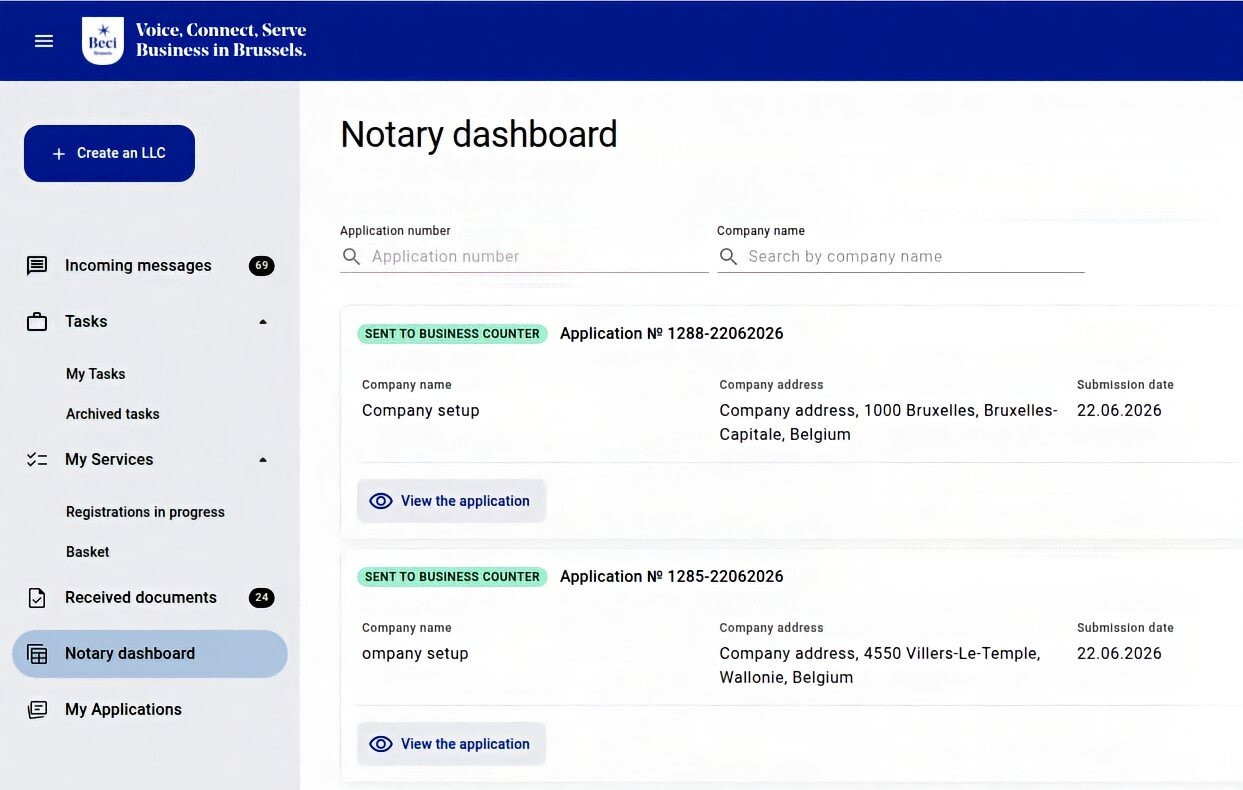
BelDoc Notary Dashboard showing company incorporation applications assigned to a notary and their current status.
The team can see the client and company information, current application status, missing information, pending actions and incorporation documents in one place.
This gives the office a lightweight way to coordinate incorporation cases internally while continuing to follow its existing working procedures.
From incorporation to the Business Counter
BelDoc also simplifies the next step after the company has been incorporated.
Once the notary completes the incorporation and the new legal entity is registered, the notary enters the company’s BCE/KBO number into BelDoc.
BelDoc can then transmit the relevant incorporation information to the Business Counter (guichet d’entreprise / ondernemingsloket), which can proceed with activating the legal entity and, where applicable, registering it for VAT.
This means the same structured incorporation file can continue through the next stage of the company registration process without the notary having to resend the same information through a separate workflow.
What does this mean for founders?
Founders are not required to manage the entire administrative process themselves.
They can ask a notary, accountant, lawyer or another trusted person to prepare the application on their behalf.
The founder only needs to participate when their personal confirmation or identity verification is required and when additional information must be provided.
Founders benefit from:
a clearer company registration process;
one shared digital application;
transparent responsibilities and next steps;
fewer repetitive requests for the same information;
easier cooperation with their accountant, lawyer and notary;
faster transfer of the completed file to the processing notary;
support from the BelDoc incorporation management and support teams.
How Belgian notaries can start using the Notary Dashboard
Registration on BelDoc is free. Belgian notaries can create a BelDoc account and, once their professional status has been verified, receive access to the Notary Dashboard.
With one account, a notary can:
receive incorporation applications;
create applications for clients;
collaborate with founders and their advisers;
manage and assign incorporation files;
track applications through the incorporation process.
The BelDoc team can also support notarial offices during onboarding and their first applications.
Create your BelDoc account and manage company incorporation applications through one structured digital workspace.